
You know the feeling.
You read an article, it makes perfect sense… and then two days later you cannot explain the main idea without re-reading the whole thing.
That is not you being “bad at learning.” That is just how memory works.
Reading is exposure. Memory is built when your brain has to pull the idea back out.
That is exactly what a tiny multiple-choice mini-quiz does.
Your Brain Learns More From Pulling Than From Re-Reading
When you re-read a paragraph, it feels smooth. Familiar. Easy.
But “easy” can be misleading.
Learning science has a strong finding called retrieval practice (also known as the testing effect). It means:
Trying to recall information strengthens memory more than simply seeing it again.
Even small “memory reps” help your brain store the concept in a way that is easier to access later.
Think of it like this:
- Re-reading is watching a workout video.
- Answering a question is doing the workout.
Why Multiple-Choice Works (If You Do It Right)
Some people say multiple-choice is “too easy” because you can guess.
Yes, free-response questions can be harder.
But multiple-choice has a huge advantage for readers:
It is fast. It is low-friction. People actually do it.
That matters.
A mini-quiz inside an article turns passive reading into an active loop:
Read → Answer → Check → Learn → Continue
Do that a few times in one post and you stop “scrolling through knowledge” and start building real recall.
The Sweet Spot: Tiny Struggle, Big Gains
Good learning often includes a small, manageable challenge.
Not stress. Not a big exam.
Just a moment where your brain goes: “Wait… what was that again?”
That tiny struggle is useful. Learning researchers call this idea “desirable difficulty.”
It is “desirable” because it improves long-term retention. It is “difficulty” because your brain has to work a little.
Mini-quizzes hit this sweet spot when they are:
- Short (so you do not quit)
- Clear (so it is not frustrating)
- A bit challenging (so it is not automatic)
- Low-stakes (so it feels safe)
Feedback Is Not Optional
Here is the key detail most quizzes miss:
A quiz without feedback can help. A quiz with feedback helps more.
Why?
Multiple-choice includes wrong options (called distractors). If a reader sees a wrong option, there is a small risk they remember it later as true.
Feedback fixes that.
The best mini-quizzes do three things:
- Tell you if you were right or wrong
- Show the correct answer
- Explain why it is correct in one or two sentences
That explanation is where learning “locks in.”
Mini-Quizzes Also Fix the “I Thought I Knew It” Problem
There is another benefit that is underrated.
Mini-quizzes improve metacognition.
Metacognition is a simple idea: it is your ability to judge what you actually know.
When you read smoothly, you often feel confident. But confidence is not proof.
A quick question reveals the truth:
- If you can answer, you really understood.
- If you cannot, you know exactly what to revisit.
That is a superpower for learners.
Want It to Stick Longer? Add Spacing
If you want memory to last, you want retrieval to happen more than once.
Not all at the same time.
Over time.
This is called the spacing effect (distributed practice). It is one of the most reliable findings in learning science.
Mini-quizzes make spacing easy:
- Ask 1–2 questions right after the concept (first retrieval)
- Ask a short recap question at the end (second retrieval)
- Ask again later in a newsletter or next lesson (third retrieval)
You just turned one article into a learning path.
What Makes a Great Mini-Quiz (Simple Checklist)
If you are adding mini-quizzes to content, these rules will get you 80% of the value.
1) Keep it micro
Aim for 2 questions per section. Not 10. Not 20.
Small quizzes reduce drop-off and keep the experience fun.
2) Test meaning, not trivia
Good questions ask about understanding:
- “Which statement best explains the concept?”
- “Which example matches what you just read?”
- “What would change if X changed?”
This builds usable knowledge.
3) Use realistic wrong answers
Distractors should be believable.
The best wrong options reflect common misunderstandings. That forces deeper thinking.
But avoid “trick questions.” The goal is learning, not gotchas.
4) Always include an explanation
One or two sentences is enough.
Explanations turn mistakes into learning and reinforce correct reasoning.
5) Make it feel safe
Mini-quizzes should feel like a friendly checkpoint. Not a judgment.
A good learning product says: “Try. Miss. Learn. Move on.”
Why This Matters for Educational Content (and Web3 Learning Too)
Most content on the internet is built for scanning.
Learning content should be built for retention.
Mini-quizzes are one of the simplest ways to upgrade any post into something interactive, memorable, and confidence-building.
And if you are teaching technical topics (blockchain, AI, dev tools), mini-quizzes are even more valuable because they help learners practice precise concepts in small steps.
Try It With LNC AI Quiz Generator
If you run a WordPress site and want this experience without writing quizzes by hand, that is exactly why we built LNC AI Quiz Generator for NEAR AI Cloud.
The plugin is now available on the official WordPress Plugin Directory:
What It Does
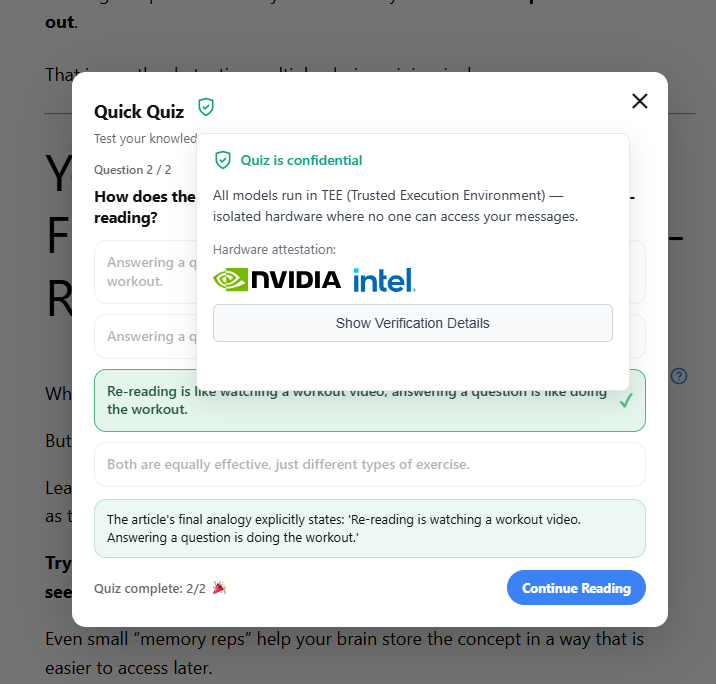
LNC AI Quiz Generator uses artificial intelligence to automatically generate educational quizzes from your article content. Simply wrap any text in a shortcode, and the plugin uses the NEAR AI Cloud API to analyze the content and create engaging multiple-choice quizzes with instant feedback and explanations.
Key Features
- AI-Powered Quiz Generation: Automatically generates contextually relevant quizzes based on your article content using advanced AI models like DeepSeek-V3.1
- Simple Shortcode Integration: Wrap any content with
lnc_ai_quiz_generator.../lnc_ai_quiz_generatorto enable automatic quiz generation - Interactive Quiz Interface: Clean, user-friendly quiz modal with instant feedback showing correct/incorrect answers and explanations
- Customizable AI Parameters: Configure model selection, temperature, max tokens, and other settings to fine-tune quiz generation
- Educational Focus: Each quiz includes 2 carefully crafted questions with 4 multiple-choice options and detailed explanations
How It Works
- Configure your NEAR AI Cloud API key in Settings → Cloud AI Client Configuration
- Wrap the content you want to quiz users on with the shortcode
- Visitors see a help icon (?) next to the content
- Clicking opens an interactive quiz modal with AI-generated questions
- Users get instant feedback with explanations for correct answers
Perfect For
- Educational Websites: Enhance learning by testing comprehension after each article
- Training Platforms: Create automatic knowledge checks for training materials
- Content Marketing: Increase engagement and time on page with interactive quizzes
- E-Learning: Add instant assessments without manual quiz creation
- Documentation Sites: Help users verify they understood technical documentation
Add a mini-quiz in one minute
lnc_ai_quiz__generator
Your paragraph or section goes here. The plugin will generate a mini-quiz from this content.
/lnc_ai_quiz_generator
Get your API key at cloud.near.ai and start turning passive readers into active learners.